Frame Photo Minimal 3D Mockup: A Smart Visual Tool for Designers and Brands
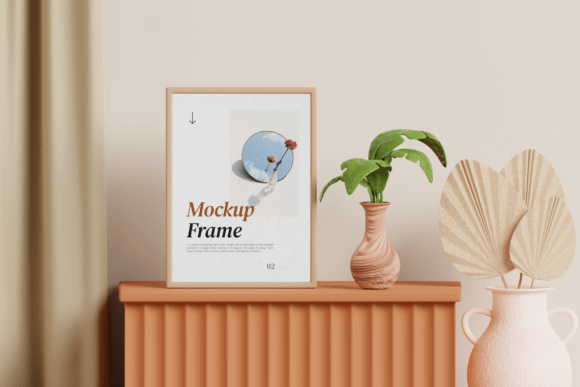
For creatives and businesses looking to present framed art, photography, or interior visuals in a clean and modern setting, the Frame Photo Minimal 3D Mockup offers a practical and visually appealing solution. This mockup features a realistic framed photo displayed on a warm wooden sideboard, enhanced with soft natural lighting, plant decor, and elegant interior styling. Designed with minimalism in mind, it's ideal for photographers, artists, print-on-demand brands, and interior designers who want to showcase their work in a lifestyle context without overwhelming the viewer.
Why the Frame Photo Minimal 3D Mockup Stands Out
Unlike generic mockups that lack context or realism, this 3D mockup blends simplicity with high-quality presentation. It allows users to insert their designs into a smart object layer, making it easy to visualize how a print will look in a real-world environment. The inclusion of a warm wooden surface, soft lighting, and subtle plant accents creates a welcoming and aspirational backdrop that resonates with modern audiences.
Common Mistakes When Using the Frame Photo Minimal 3D Mockup
While this mockup is user-friendly, there are several pitfalls that users—especially beginners—often fall into when selecting, downloading, or applying it to their projects. Understanding these common mistakes can help you avoid unnecessary frustration and ensure your final visuals are polished and professional.
1. Not Checking File Compatibility
One of the most frequent oversights is assuming the Frame Photo Minimal 3D Mockup will work with any design software. It’s built as a PSD file with smart object layers, meaning it requires Adobe Photoshop for full functionality. Trying to edit it in incompatible programs like Canva or Illustrator can lead to distorted visuals or broken layers.
Better approach: Confirm you have access to Photoshop before downloading. If not, consider using a similar mockup designed for your preferred platform or opt for online tools that support PSD imports.
2. Overlooking Image Resolution and DPI
The mockup offers a high-resolution size of 4000 x 3000 pixels at 300 dpi, which is excellent for print and digital use. However, some users mistakenly assume that any image they insert into the smart object will automatically look sharp. Low-resolution artwork or compressed images can appear blurry once embedded.
Better approach: Always use high-quality source images (at least 300 dpi) when inserting into the smart object. This ensures your final output maintains a professional appearance, especially if you plan to use it for printed materials or high-end client presentations.
3. Misjudging the Lighting and Background Style
The soft natural lighting and minimalist interior setting are part of what makes this mockup so appealing. However, some users attempt to force designs that clash with the scene—such as high-contrast graphics or neon colors—which can look out of place and disrupt the intended aesthetic.
Better approach: Choose designs that complement the warm, light-filled environment. Neutral tones, organic textures, and clean typography tend to blend well with the mockup’s styling. If your design is bold or vibrant, consider using a different mockup that matches its energy.
4. Forgetting to Customize the Scene
While the Frame Photo Minimal 3D Mockup comes with a complete interior setup, some users don’t realize they can tweak elements like the wooden surface, plant placement, or background to better suit their brand or product. Sticking strictly to the default layout can limit the mockup’s versatility.
Better approach: Explore the layer options in Photoshop to hide or adjust non-essential elements. You might swap out the plant for a different decor item or adjust the lighting to match your brand’s mood. Customizing the scene helps your design feel more intentional and cohesive.
What to Check Before Downloading or Using the Mockup
Before committing to the Frame Photo Minimal 3D Mockup, it’s wise to review several key details to ensure it meets your specific needs:
- Software Requirements: Make sure you have Adobe Photoshop or access to a compatible tool for editing smart objects.
- Image Quality: Verify that the final output resolution (4000 x 3000 pixels) suits your intended use, whether for web, social media, or print.
- Stock Image Usage: The mockup does not include image stock, so you’ll need your own high-quality visuals to insert into the frame.
- Licensing: Review the license terms to ensure the mockup can be used for both personal and commercial purposes, especially if you’re creating visuals for a client or product line.
How to Use the Mockup Effectively for Branding and Presentation
Whether you're showcasing a new line of art prints or presenting a client’s photography portfolio, the Frame Photo Minimal 3D Mockup can elevate your visual storytelling. Here are a few tips to make the most of it:
- Align with Your Brand Aesthetic: If your brand leans toward Scandinavian, bohemian, or modern minimalism, this mockup is a great fit. If not, look for mockups that reflect your specific style.
- Create a Series: Use multiple variations of the mockup with different design inserts to build a cohesive visual library for your website or social media.
- Test on Different Devices: Preview how your final image looks on both desktop and mobile screens to ensure clarity and readability.
- Include Contextual Text: Add subtle branding elements like your logo or a tagline near the frame to reinforce your identity without overpowering the design.
Final Thoughts
The Frame Photo Minimal 3D Mockup is more than just a visual placeholder—it's a tool that helps you communicate the value and quality of your work in a realistic and stylish way. By avoiding common mistakes and taking the time to customize and optimize your use of the mockup, you’ll create visuals that not only look professional but also resonate with your audience.
Whether you're a photographer building a portfolio, a print-on-demand brand launching a new collection, or an interior designer showcasing framed artwork, this mockup provides a clean, elegant, and practical solution for your visual presentation needs.