iPhone 16 3D Mockup: A Practical Tool for Designers, Marketers, and Entrepreneurs
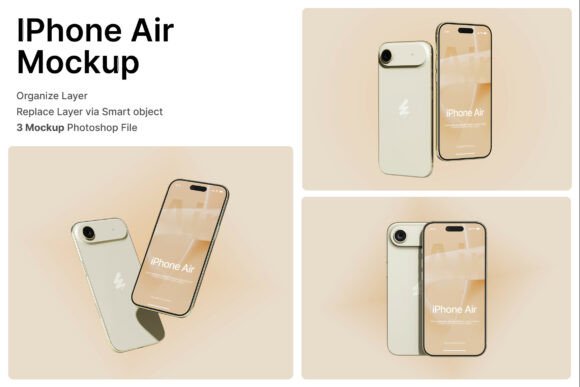
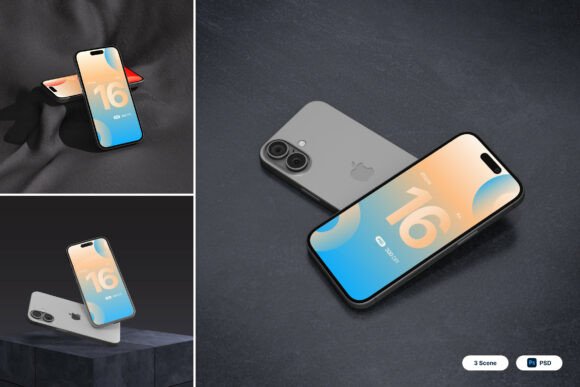
Whether you're launching a new app, pitching a digital product, or showcasing a mobile interface, the iPhone 16 3D Mockup offers a powerful visual solution. This high-quality mockup pack gives creators and professionals a realistic way to present their mobile designs with precision and polish. Designed with customization in mind, it includes smart object layers, high-resolution files, and multiple viewing angles that reflect how a real iPhone 16 would look in use.
Why Use a 3D Mockup for Mobile Designs?
Visual presentation matters—especially in digital marketing and product development. A well-crafted mockup can turn a flat design into a compelling visual story. The iPhone 16 3D Mockup helps bridge the gap between concept and reality by placing your app, website, or branding elements into a lifelike smartphone environment. This makes it easier for clients, investors, or customers to visualize the final product in action.
Unlike generic templates, this mockup pack is built with attention to detail. The screen displays are sharp, the angles are dynamic, and the customizable interface areas let you tailor the look to your specific project. Whether you're a UI/UX designer or a startup founder preparing for a pitch, this tool can help your ideas stand out.
Real-World Uses for the iPhone 16 3D Mockup
Let’s look at some practical scenarios where this mockup can make a real difference:
App Development and UI/UX Previews
For mobile app developers and UI/UX designers, showing a working prototype isn’t always enough. Stakeholders often need to see how the app will appear on an actual device. With the iPhone 16 3D Mockup, you can insert your app interface into a realistic smartphone display. This helps communicate the look and feel of your app in a way that wireframes or screenshots alone can’t match.
Imagine presenting a new fitness app to potential investors. By using the mockup, you can show how the app appears on the phone’s screen while the user is jogging. This visual context makes the experience more relatable and engaging.
Marketing and Tech Promotions
Marketers and tech startups often need to showcase new products before they’re fully launched. Using the iPhone 16 3D Mockup, you can create promotional visuals that look professional and polished, even if the product is still in development.
For example, a digital marketing agency might use the mockup to create visuals for a client’s upcoming mobile campaign. By placing the campaign’s interface into a realistic iPhone 16 frame, they can create visuals that align with the client’s brand while giving a clear sense of how the final product will appear.
Ecommerce and Branding
Brands that sell mobile accessories or digital tools can use this mockup to enhance their product listings. A high-quality image showing a branded app interface on an iPhone 16 can help customers understand the value of a digital product or service.
For instance, a Shopify store selling mobile UI kits could use the mockup to show how each kit looks on a real phone. This not only adds credibility but also helps shoppers visualize how the product will work for them.
Social Media and Content Creation
Content creators and bloggers often need to share design work, tutorials, or product reviews. The iPhone 16 3D Mockup makes it easy to create visually engaging posts that capture attention and communicate ideas clearly.
If you run a design blog or YouTube channel, you can use the mockup to showcase before-and-after design changes, app interface walkthroughs, or mobile branding tips. The realistic visuals help your audience grasp the topic more quickly and retain the information better.
Who Benefits Most from This Mockup Pack?
The iPhone 16 3D Mockup is versatile enough for a wide range of users:
- Freelance designers can use it to build professional portfolios and pitch new clients.
- Startup founders can create investor-ready visuals without hiring a 3D artist.
- Marketing teams can streamline campaign visuals with consistent, high-quality mockups.
- Educators and trainers can use it to demonstrate UI/UX principles in a real-world context.
- Small business owners can enhance product visuals for online stores or promotional materials.
Each of these users brings a different need to the table, but they all benefit from the mockup’s flexibility and realism. Whether you're designing a new fintech app or teaching students about mobile branding, this tool helps you communicate your ideas more effectively.
What to Consider Before Using the iPhone 16 3D Mockup
Before diving in, there are a few practical points to keep in mind:
- Adobe Photoshop is required – The package includes three PSD files, so you’ll need Photoshop to edit and customize the layers.
- Smart object layers simplify customization – Just double-click the layer, insert your design, and save. It’s a straightforward process, even for beginners.
- High resolution matters – At 4000 x 3000 pixels and 300 dpi, the images are print-ready and suitable for both web and offline use.
- Stock images are not included – If you want to add background scenes or lifestyle visuals, you’ll need to source those separately.
Also, consider your end goal. If you’re creating visuals for a client presentation, you might want to focus on clean, minimal backgrounds. If you're designing for social media, you may prefer dynamic angles that catch the eye in a feed. The iPhone 16 3D Mockup supports both approaches, but knowing your audience helps you make the most of it.
How This Mockup Fits Into the Bigger Picture
Design tools come and go, but presentation quality remains a constant need. Whether you're building a personal brand, launching a product, or running a marketing campaign, visuals play a crucial role in how your message is received.
The iPhone 16 3D Mockup isn’t just about making things look pretty—it’s about clarity, communication, and connection. When your audience can clearly see what you're offering, they’re more likely to engage, invest, or take action. That’s why this mockup is more than a design asset—it’s a communication tool that helps you speak more effectively to your audience.
In a world where digital presence is everything, having the right visuals can make all the difference. And with the iPhone 16 3D Mockup, you’re equipped to do just that—clearly, professionally, and creatively.