Desk Portrait Calendar 3D Mockup: A Realistic Tool for Office Branding and Presentation
Creating a professional and visually appealing presentation for office stationery or corporate merchandise can be challenging without the right tools. The Desk Portrait Calendar 3D Mockup offers a streamlined solution for designers, marketers, and business owners looking to showcase spiral-bound portrait calendars in a realistic and engaging way. Whether you're promoting a yearly planner, designing company swag, or preparing a product portfolio for a printing service, this mockup provides a versatile and high-quality option.
Understanding the Desk Portrait Calendar 3D Mockup
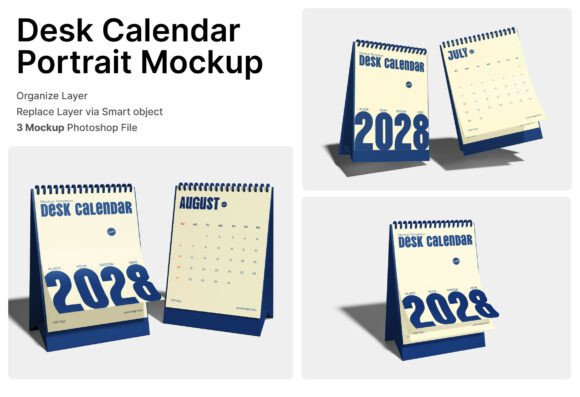
The Desk Portrait Calendar 3D Mockup is a digital design tool that allows users to display their calendar designs in a lifelike setting. It includes three PSD files that support smart object layers—making it easy to insert your artwork with just a few clicks. Simply double-click the designated layer, place your design, and save to instantly visualize how your calendar will look in a real-world environment.
Each mockup features a standing spiral-bound calendar in a portrait orientation, complete with a tabletop display angle and a flipped page view. These elements help showcase the monthly layout and overall aesthetic of the calendar, offering a more dynamic and immersive presentation than flat 2D images.
Key Features of the Mockup
- Smart Object Layers: Simplify the customization process with editable smart layers that allow you to insert your design seamlessly.
- Realistic 3D Presentation: View your calendar in a natural office setting, helping clients or stakeholders visualize the final product.
- Flipped Page Views: Highlight the layout and design of multiple months with realistic page transitions.
- High-Resolution Output: The mockup is designed at 4000 x 3000 pixels with a resolution of 300 dpi, ensuring crisp and detailed visuals for print or digital use.
- PDF Help Guide: Includes a user-friendly guide to help you navigate the setup and customization process quickly.
Who Can Benefit from This Mockup?
The Desk Calendar Portrait 3D Mockup is ideal for a wide range of professionals and businesses, including:
- Graphic Designers: Showcase your calendar designs in a professional context without the need for physical prototypes.
- Marketing Teams: Use realistic visuals in promotional materials for company merchandise or event giveaways.
- Office Product Retailers: Present product lines in a visually appealing way on websites or in catalogs.
- Event Planners: Create branded calendars for conferences, workshops, or annual company events.
- Print Services: Provide clients with a preview of how their custom calendars will look once printed.
Practical Applications in Real-World Scenarios
Let’s explore a few real-world examples of how this mockup can be used effectively:
- Corporate Branding: A company launching a new brand identity can create a custom calendar with their logo and color scheme, then use the mockup to show how it fits into a modern workspace.
- Product Launches: A stationery brand introducing a new line of desk calendars can use the mockup to generate product images for e-commerce sites or social media campaigns.
- Promotional Giveaways: A marketing agency planning a client event can design a branded calendar and present it using the mockup to demonstrate its appearance on a recipient’s desk.
- Design Portfolios: Freelance designers can include realistic mockup visuals in their portfolios to demonstrate their ability to create practical and aesthetically pleasing calendar designs.
What Sets the Desk Calendar Portrait 3D Mockup Apart?
Unlike generic image templates, the Desk Calendar Portrait 3D Mockup offers a high level of realism and flexibility. The ability to show multiple pages and angles makes it easier to communicate the functionality and design of the calendar. Additionally, the high-resolution output ensures that the mockup is suitable for both digital and print use, making it a versatile asset for various projects.
Another key advantage is the inclusion of a PDF help guide. This makes the mockup accessible even to those who are not experienced with Photoshop, as it walks users through the process of inserting and adjusting their designs.
Considerations and Limitations
While the Desk Portrait Calendar 3D Mockup is a powerful tool, it's important to understand its limitations:
- Image Stock Not Included: Any background or lifestyle images used in the mockup are not part of the downloadable files and must be sourced separately.
- Software Requirements: Users will need Adobe Photoshop to edit the smart objects, which may be a barrier for those unfamiliar with the software.
- Customization Constraints: While the mockup allows for design insertion, the overall layout and perspective are fixed, so significant changes to the scene are not possible.
Despite these limitations, the mockup remains a highly effective tool for those looking to present their calendar designs professionally and efficiently.
Evaluating Suitability for Your Project
When considering whether the Desk Portrait Calendar 3D Mockup is the right fit for your project, ask yourself the following questions:
- Do you need a realistic presentation of a spiral-bound portrait calendar? If yes, this mockup is ideal for showcasing your design in a professional setting.
- Will you be presenting your calendar for branding, marketing, or sales purposes? The mockup helps create visuals that resonate with clients and stakeholders.
- Are you comfortable using Photoshop or do you have access to someone who is? While the process is straightforward, some familiarity with the software is required.
- Is high-quality output important for your use case? The 300 dpi resolution ensures your visuals will look sharp in both digital and printed formats.
Conclusion
The Desk Portrait Calendar 3D Mockup is more than just a design template—it's a practical solution for professionals who need to present calendar designs in a realistic and compelling way. Whether you're branding office supplies, creating promotional products, or developing a product catalog, this mockup offers a quick, high-quality way to visualize your work without the need for physical samples.
By leveraging its smart object layers, realistic angles, and high-resolution output, you can streamline your design process and impress clients with professional-grade visuals. Just remember to consider your project requirements and software capabilities to ensure this tool fits your needs effectively.